PlayStation Plus Essential is Sony’s entry-level subscription for PS5 and PS4. It is the plan to consider if you need online multiplayer for purchased games and want Monthly Games, cloud save storage, Share Play and member-only Store discounts without paying for the larger Game Catalog. As checked on July 28, 2026, US pricing is $10.99 for one month, $27.99 for three months or $79.99 for 12 months. The annual option is substantially cheaper per month, but Essential is not automatically a good buy for everyone. Most free-to-play games do not require it, and it does not include the downloadable catalog supplied with Extra. This guide explains exactly what the plan provides, how claimed games work and which billing term makes sense.
PlayStation Plus Essential price in 2026
Sony offers Essential in three recurring billing periods in the United States. These are the regular PlayStation Store prices visible when this guide was checked; taxes can change the checkout total, and other countries have their own prices.
| Billing period | US price | Effective monthly cost | Cost across 12 months |
|---|---|---|---|
| 1 month | $10.99 | $10.99 | $131.88 |
| 3 months | $27.99 | About $9.33 | $111.96 |
| 12 months | $79.99 | About $6.67 | $79.99 |
At those rates, paying annually saves $51.89 compared with twelve monthly payments and $31.97 compared with four quarterly payments. That is meaningful if you know you will use the service for a full year. A one-month term remains useful when you only need online access for a short multiplayer season, while three months offers a middle ground with less commitment.
Every option is an ongoing subscription rather than a one-time pass. Sony’s US terms say it renews automatically at the then-current regular Store price until canceled. Check the renewal date and price shown on your own account before confirming, especially if you previously received a promotion or use a non-US account. Canceling turns off the next payment; it does not normally remove access before the period already paid for ends.
What PlayStation Plus Essential includes
Essential contains the core benefits shared by all three PS Plus tiers. Extra and Premium build on this foundation, so choosing Essential does not mean receiving an inferior version of online multiplayer or cloud saves. The important difference is access to additional game libraries and Premium features.
Online multiplayer—and the free-to-play exception
Most PS4 and PS5 games that you buy on disc or through PlayStation Store require an active PS Plus membership for their online multiplayer modes. Essential satisfies that requirement, whether you want competitive matches, co-op campaigns or shared online worlds.
There is a major exception: most free-to-play games do not require PS Plus. Sony specifically uses Fortnite, Apex Legends and Call of Duty: Warzone as examples. If those are the only online games you play, do not subscribe merely because a generic message says console multiplayer usually needs Plus. Check the game’s PlayStation Store page because requirements can differ, and child accounts may face separate age or parental-control restrictions.
Monthly Games you claim to your library
Essential subscribers receive a changing selection of Monthly Games. Each lineup has a defined claim window. During that window, select the title and add it to your library; you do not need to install a large game immediately. On PS5, the membership area presents a Download option, while the PS4 flow explicitly offers “Add to Library” before download. Remote actions are also available through a browser or the PlayStation App.
For example, the official July 2026 lineup was scheduled from July 7 through August 3. That date range illustrates why claiming matters: missing the window means losing the opportunity to attach that month’s license to your account. Lineups can also differ by region. For the changing dates and titles rather than an old snapshot, check our current PlayStation Plus Monthly Games page.
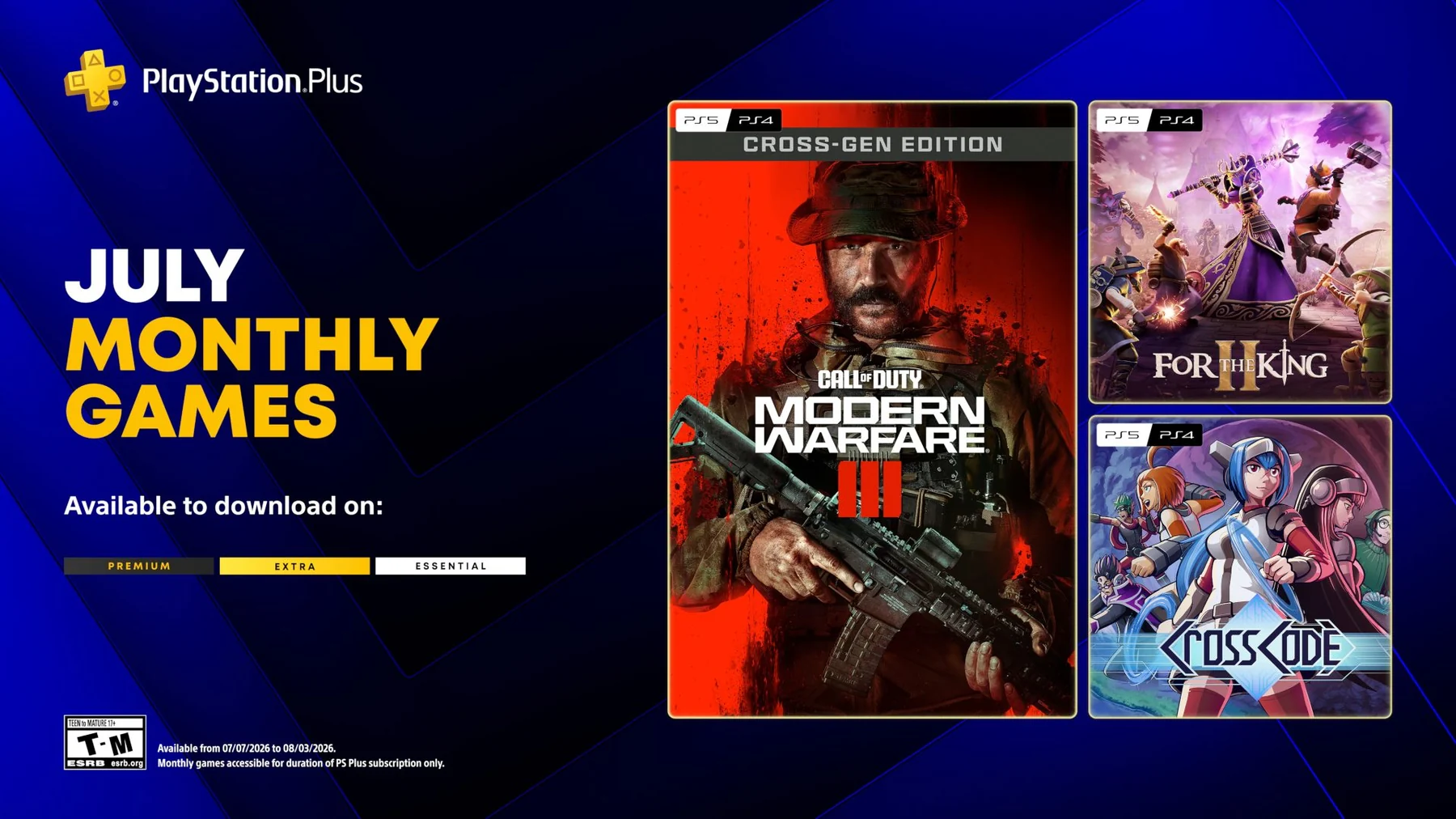
“Claimed” does not mean purchased outright. A Monthly Game remains playable while your qualifying PS Plus membership is active. This arrangement differs from the Game Catalog: a claimed Monthly Game is associated with your account after its claim window, whereas a catalog title can leave the service on a published removal date.
Cloud storage, Share Play and member discounts
Essential includes online save storage. PlayStation Support currently specifies up to 100 GB for PS4 saved data and another 100 GB for PS5 saved data, with a limit of 1,000 PS4 save files. This is useful when replacing a console, moving between systems or recovering from local-storage trouble. It is still wise to confirm that recent saves have synced before wiping or trading a console.
Share Play lets you stream a play session to a friend so they can watch, join or, in supported circumstances, take control without owning the game. Selected Plus benefits can also be shared on one primary PS4 and one PS5 with Console Sharing and Offline Play enabled. That does not turn one subscription into unlimited independent memberships; the subscribing account keeps control of claiming games, cloud storage and account-level management.
Exclusive PlayStation Store discounts and occasional subscriber content are included too. Treat a discount as a bonus rather than guaranteed value: eligible games, discount depth and promotional timing change. Compare the member price with a game’s normal sale history instead of buying simply because it carries a Plus badge.
What Essential does not include
The easiest way to avoid disappointment is to understand that Monthly Games are not the same as the Game Catalog. Essential provides only the small claimable monthly selection. Extra adds the larger downloadable PS4 and PS5 Game Catalog plus Ubisoft+ Classics, while Premium adds features such as the Classics Catalog, selected Game Trials and cloud streaming where supported.
| Benefit | Essential | Extra | Premium |
|---|---|---|---|
| Monthly Games and online multiplayer | Yes | Yes | Yes |
| Game Catalog | No | Yes | Yes |
| Classics Catalog and Game Trials | No | No | Yes |
| Cloud streaming | No | No | Premium, where available |
If your main goal is to sample many games rather than play one or two purchased games online, browse the live PS Plus Extra catalog before choosing. Catalog size and regional availability change, and Premium may be called Deluxe in markets where cloud streaming is not offered. Do not pay for a higher tier based on a game you saw in an old list without checking its present availability.
What happens to claimed games if Essential expires?
When Essential expires, access to claimed Monthly Games is suspended. The titles may remain visible in your library, but the subscription license is no longer active. Renewing a qualifying PS Plus plan normally restores access to Monthly Games previously claimed on that account. A lapse does not convert them into ordinary purchases, and buying DLC does not buy the base game.
This is one reason the phrase “free games” can be misleading. You pay for a membership that licenses access under its rules. Sony’s terms also warn that if a subscription lapses—or a catalog game leaves—access to add-ons, virtual currency or other consumables bought for a Plus game may be unavailable until you renew or purchase the base game. If a game is important enough that you want unconditional access, buying it is safer than relying on the subscription license.
Canceling and expiring are separate events. If you turn off renewal today, benefits generally continue until the end of the paid billing period. Use that time to sync saves and finish online plans. The full PS Plus games list can help you distinguish currently included games, but your account’s transaction history is the better record of Monthly Games you personally claimed.
Is the 12-month Essential plan worth it?
The 12-month plan is usually the best Essential value for someone who regularly plays purchased games online and expects to stay on PlayStation for the year. Its current effective cost is about $6.67 per month, far below repeated monthly billing. Cloud backups and games you genuinely play can make the case stronger.
It is less attractive if you mostly play offline, only use free-to-play multiplayer, or routinely forget to claim Monthly Games. Do not add the full retail price of every monthly title and call that your savings. A game has practical value to you only if you claim it and want to play it. The same applies to Store discounts: count only purchases you would have made anyway.
- Choose one month if you need a brief online window or want to test the service before committing.
- Choose three months if your play schedule is seasonal but too long for one billing cycle.
- Choose 12 months if paid-game multiplayer is a year-round habit and the upfront cost fits your budget.
- Consider Extra instead if a rotating downloadable catalog would replace several game purchases.
Before upgrading, look at games you would realistically start, not just the number advertised. Our guide to the best games on PS Plus is a useful shortlist, while the live catalog pages answer whether a specific title is still included.
How to get the most from Essential
- Claim every Monthly Game that interests you. Adding a title to the library is enough; storage space can wait.
- Check the exact edition and platform. A listing may include PS4, PS5 or a cross-gen bundle, and regional lineups can differ.
- Verify cloud saves before changing consoles. Confirm the timestamp rather than assuming every save synced.
- Compare discounts before buying. A member sale can be useful, but it is not automatically the lowest historical price.
- Set a renewal reminder. Review the displayed price and your usage before the recurring charge.
- Reassess your tier. Upgrade only when the Game Catalog, Classics, trials or streaming would add real value; downgrade at the end of the paid term if they do not.
Sony announced that beginning in January 2026, PS4 games would be added to Monthly Games and catalogs only intermittently. PS4 owners should therefore inspect platform labels carefully instead of assuming every month includes a native PS4 option.
Frequently asked questions
Is PlayStation Plus Essential required for every online game?
No. Most purchased PS4 and PS5 games require a PS Plus plan for online multiplayer, but most free-to-play games do not. Check the individual Store listing for exceptions.
Can Essential members play Extra catalog games?
Not through Essential alone. The Game Catalog starts with Extra. Essential members can still buy those games separately from PlayStation Store.
Do claimed Monthly Games stay in the library?
They stay associated with the account after being claimed in time, but they require an active qualifying PS Plus membership to play. They are not ordinary permanent purchases.
Does Essential work on both PS4 and PS5?
The membership is tied to your PlayStation account and works across supported consoles when you sign in. Individual games and features still have platform requirements. PS4 additions became intermittent from January 2026.
Can I share PlayStation Plus Essential?
Selected benefits can be shared with other users on a primary PS4 and one PS5 with Console Sharing and Offline Play enabled. Account-specific features, including subscription management and personal cloud storage, are not transferred to those users.
Comments
Comments are reviewed before publication. Please keep the discussion helpful and on topic.
Sign in with Google to comment
Loading comments...